Object Oriented Programming in C#
Creating a class
In OOP, we organize our code into classes which contain data and methods. Later we can use these Classes to create objects/variables. To make a class: create a new class item in visualstudio:
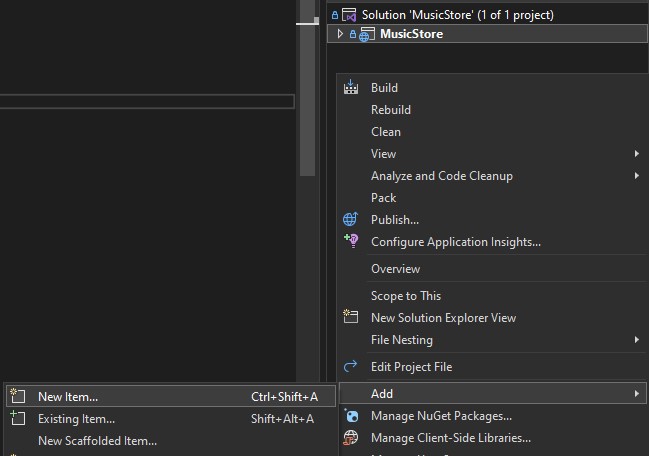
First add -> New item:
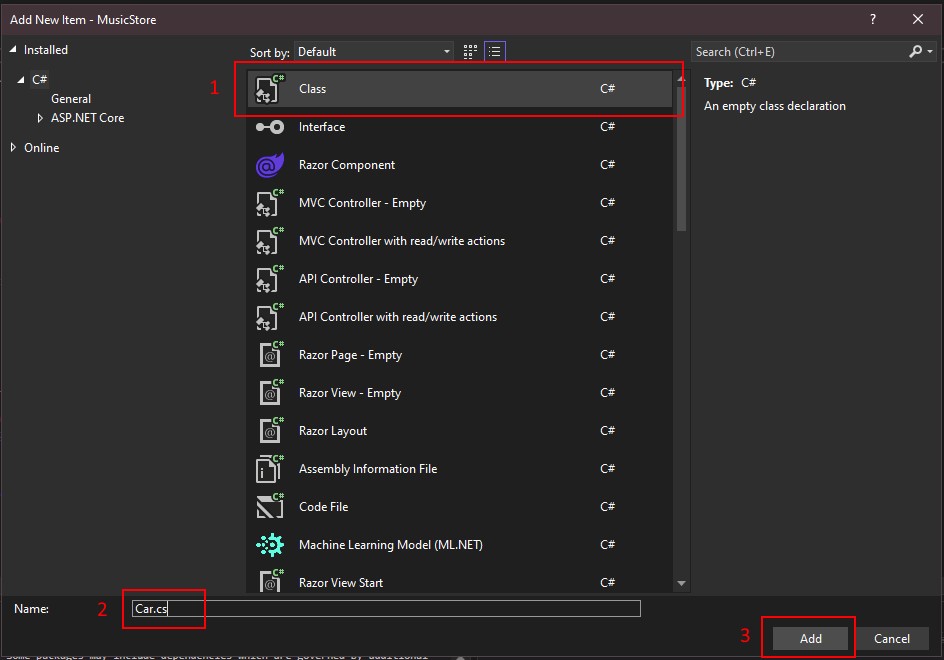
Click on "Class" and fill in a name (eg. Car.cs)
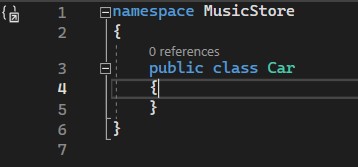
After pressing "Add" you should get a new file car.cs in your solution explorer. And should see this code:
Adding data and methods
class Person {
    // properties (data)
    public string Name { get; set; }
    public int Age { get; set; }

    // methods
    public void SayHello() {
        Console.WriteLine("Hello, my name is " + Name + " and I am " + Age + " years old.");
    }
}
In this example you can see the class Person, it has 2 properties, a name (string) and age (integer).
Constructor
The constructor allows us to create new instances of the Person class with specific initial, or modified values for class' properties.
class Person {
    // properties (data)
    public string Name { get; set; }
    public int Age { get; set; }

    // constructor
    public Person(string firstName, string lastName, int age) {
        Name = firstName + " " + lastName;
        Age = age;
    }

    // alternative constructor
    public Person(string name) {
        Name = name;
        Age = 0;
    }
}
How do we use a class in code?
// Add import
using Person;

// Creating an object
Person person1 = new Person("Alice", 25);

// Using an object's method
person1.SayHello();
Method output:
Hello, my name is Alice and I am 25 years old.// Using getters and setters:
Console.WriteLine(person1.Name);
person1.Age = 24;
Console.WriteLine(person1.Age);
ToString function
In C#, the ToString() method is used to convert an object into a string representation. By default, the ToString() method returns "the fully qualified name of the object's class". However, you should override this method to return a custom string providing more meaningful information.
public override string ToString()
{
    return $"{Name} - {Age}";
}
Access Modifiers
Access modifiers are keywords used to specify the accessibility of classes, methods, properties, fields, and other members of a program. The four main access modifiers in C# are public, private, protected, and internal.
public members can be accessed from anywhere, including from outside the class, making them the most permissive access modifier.
private members can only be accessed within the class where they are defined, making them the most restrictive access modifier.
When you generate a class it will be internal by default, you should change this to public.